Bluetooth-compatible Finrprint Door Lock USB Charging Door Knobs Lock With 2 Keys Finrprint Security Handle Lock For Bedroom ,Easy Installation
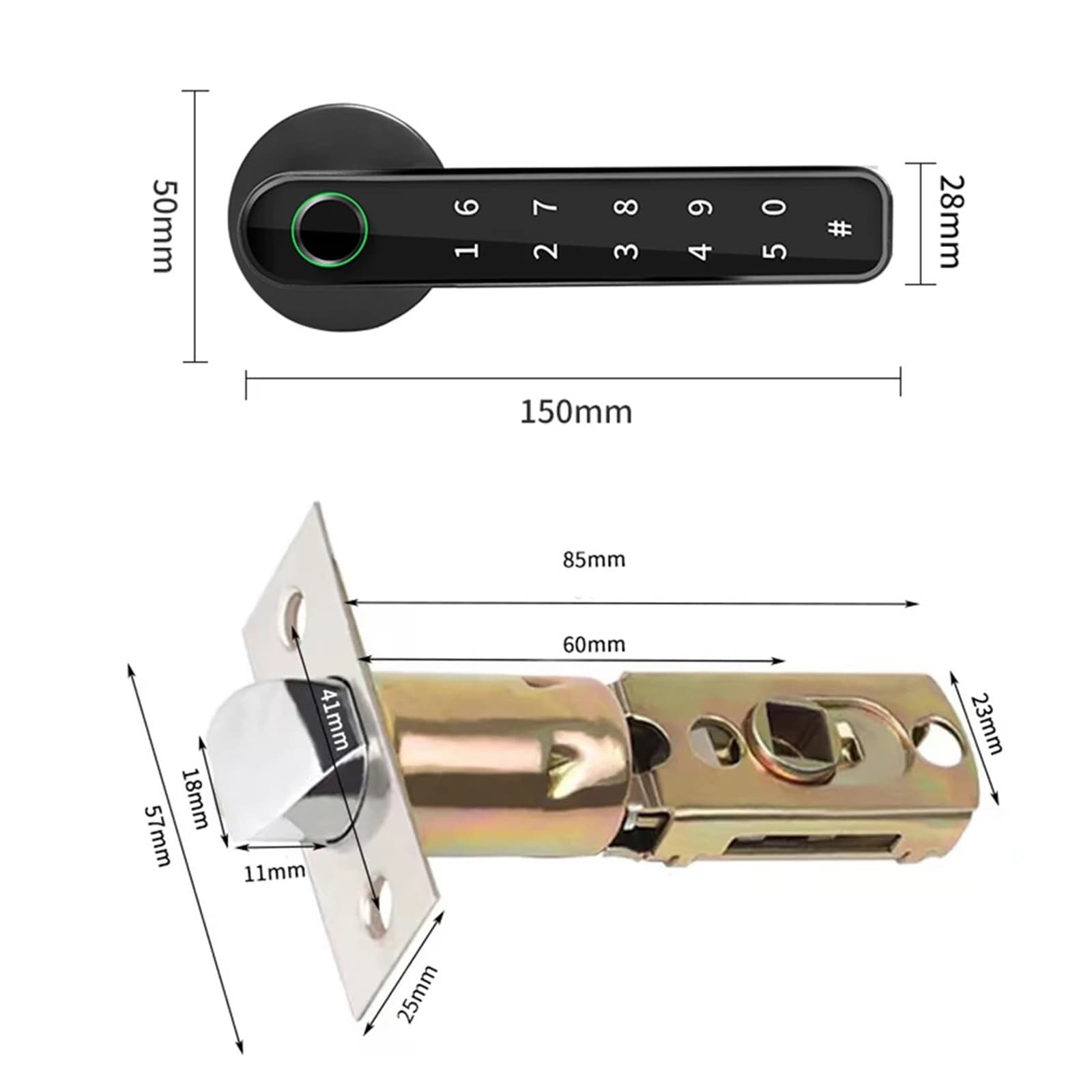
USB Charging Bluetooth-compatible Door Knobs Lock Lever Handle Lock Keyless Entry Finrprint Security Handle Lock for Apartment Feature: 1. Multiple unlocking methods: Including finrprint, anti-privacy virtual password, traditional mechanical spare key (including 2). One-touch finrprint access, reads your finrprint and unlocks your door. The finrprint capacity is lar, which can store 50 finrprints. Convenient to store finrprints of family members or close friends. 2. Smart Tuya APP: Easily realize the intellint life of home interconnection. Real-time ment, door opening record, checking door lock status (networking status, unlocking record, abnormal alarm, remote unlocking, power reminder) (optional). 3. USB charging port emerncy and spare key: When the battery is seriously low or the battery is completely exhausted, you can use the spare key to open the door. With its own USB charging port, it can also temporarily supply power when connected to a e power bank. 4. Adjustable volume: You can adjust the sound. 0 is silent, 1 is low volume, 2 is medium volume, and 3 is high volume. Silent mode won't bother you when you t home late at night. The door lock adopts a free handle design, which can prevent malicious violence from destroying the lock body and dama to the internal parts. The handle is interchanable left and right. When entering the room, touch the password button to turn on the screen, which is practical and convenient. No wires and no professional required. It works on most doors that use a lever door lock and works with left and right handles. 5. Anti-peeping design: The fake password anti-peeping design can enter garbled characters before and after the correct password. It will effectively protect the personal safety of you and your family. This door lock will provide you top-notch security, utilizing semiconductor and biometric technology to avoid identical finrprints. Ergonomic design allows you to quickly unlock within 0.3 seconds, just put your finrprint on the door. It will automatically lock for you. Indoor installation can be the second line of defense for the home. Installed in offices and factories, it is easier to control employee access and can replace traditional access control equipment. Specification: Smart home platform: Tuya Model Number: Smart finrprint lock Handle Direction: Direction Reversible Ways To Unlock: Finrprint,Password,Mechanical Keys Doorknob Funcition: Biometric,Key & Keypad Finish Type Polished Suitable Door Type s DoorWooden Door Protection Level No Waterproof Power Supply Dry Battery Material Zinc alloy Color Black, silver (optional) Style: (optional) NO Tuya APP: 196 - finrprint - password - key - normally open function - electronic anti-lock With Tuya APP: TY196 - finrprint - password - key - normal open function - electronic anti-lock - Tuya APP Power supply: 6V Low battery alarm: 4.3V Current: <150mA Motor current: <30Ua Power supply: 4 X AAA batteries (not included) / USB emerncy charging Finrprints: 50 Password: 100 groups (the first three are administrators) Dimensions: 150x65x28mm/5.91x2.56x1.1in Handle width: (about) 2.8cm/1.1in Packa size: 25.5x18x8cm/10.04x7.09x3.15in Packa weight: 0.88kg Finrprint type: Semiconductor finrprint head Lock cylinder level: C-level lock cylinder Emerncy keys: 2 Operate: 1. Add finrprints (the first 3 finrprint users are administrators, and the fourth and above finrprints are ordinary users) A: Add a user for the first time: Press the setting button - the blue light flashes - press your finr 5 times until the green light is always on, indicating success, the entry is completed and the setting is automatically exited B: The second addition: press the setting button - the blue light flashes - verify the administrator once - the verification is successful, the blue light is always on - enter a new finrprint and press the finr 5 times until the green light is always on, indicating success 2. Delete finrprint Press and hold the setting button for 9 seconds - the blue light flashes, and the red light flashes after 9 seconds, release the hand, and the green light appears, indicating that the factory reset is successful Note: The product comes with English instructions, please follow the instructions to install and set up the smart door handle. Due to the different monitor and light effect, the actual color of the item might be slightly different from the color showed on the pictures. Thank you! Please allow 1-2cm measuring deviation due to manual measurement. 1 X Smart Door Lock Body 1 X Mounting Kit 2 X Keys 1 X Manual Related Products:smart door lock,door lock,keyless entry door lock,fingerprint door lock,smart locks for front door,door lock with code,keyless entry door lock with handle,fingerprint door knob
Shipping & Returns
Shipping & Returns