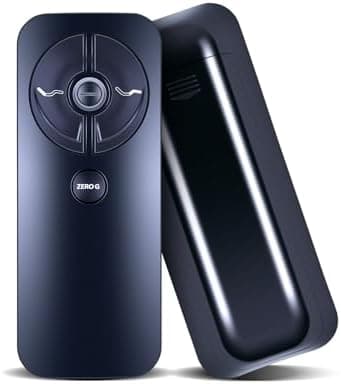
RF399A RF368B Replacement Adjustable Bed Remote Control — Compatible with Sealy / Tempur-Ergo Ease 2.0/3.0/4.0 Adjustable Bed JLDK.30.03.20
Compatibility: New RF399A RF368B replacement remote control for Sealy Ease 2.0/3.0/4.0 and Tempur-Ergo Ease 2.0/3.0/4.0 Adjustable Bed model JLDK.30.03.20. Important: This is not a universal adjustable bed remote. Confirm your model number before ordering. Quick troubleshooting: If the remote is unresponsive, check the following before attempting pairing: 1) Verify batteries are installed correctly and are not drained. 2) Ensure the remote’s child lock is disabled (deactivation methods vary by model). 3) Power-cycle the base: disconnect from power for 1 minute, then reconnect and try again. If pairing still fails, try the alternate pairing method below. Pairing — Method 1: 1) Locate the battery backup box on the base and press the button TWICE. A light on the battery backup box will turn on. 2) Slide off the remote’s rear cover and press and hold the PAlR button. The PAlR button will light blue and begin flashing. When the PAlR button stops flashing, the light on the battery backup box will go out. Release the PAlR button — the remote should now be paired to the adjustable base. Pairing — Method 2: 1) Remove the back cover of the remote by sliding it down to reveal the PAlR button. Unplug the Power Cord from your power outlet. Wait 1 minute, then plug it back in. Perform Step 2 within 10 seconds while the control box light is flashing. 2) Press and hold the PAlR button on the back of the remote. The PAlR button will illuminate and begin flashing. When the PAlR button stops flashing, the LED on the control box will stop flashing as well. Release the PAlR button — pairing is complete. After-sales service: If you have any questions about your order or need help confirming your model, contact us and we will respond within 12 hours on weekdays.
Shipping & Returns
Shipping & Returns