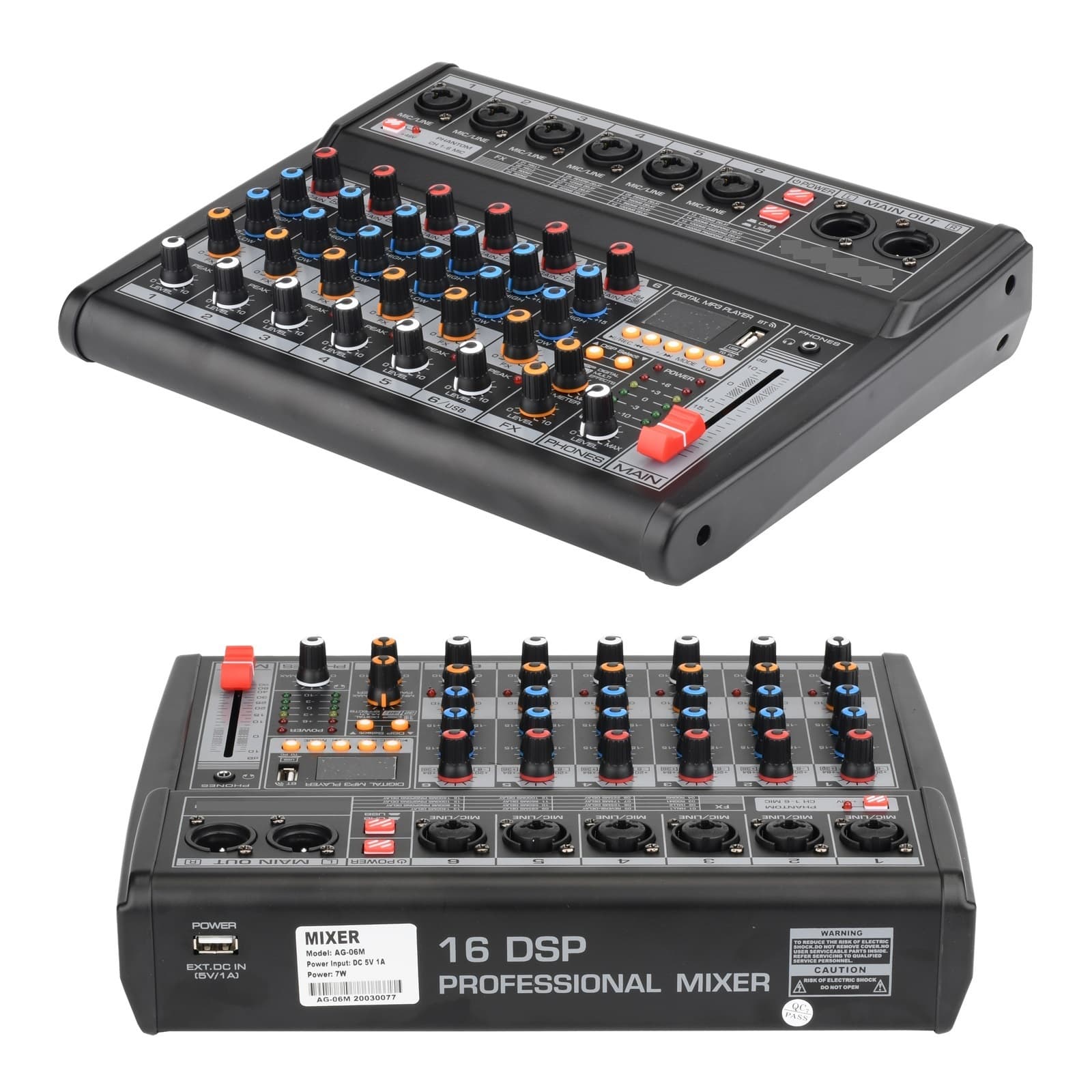
Sound Card Mixing Console 48V Phantom Power 16 Digital USB Record Function Mixer 6-channels
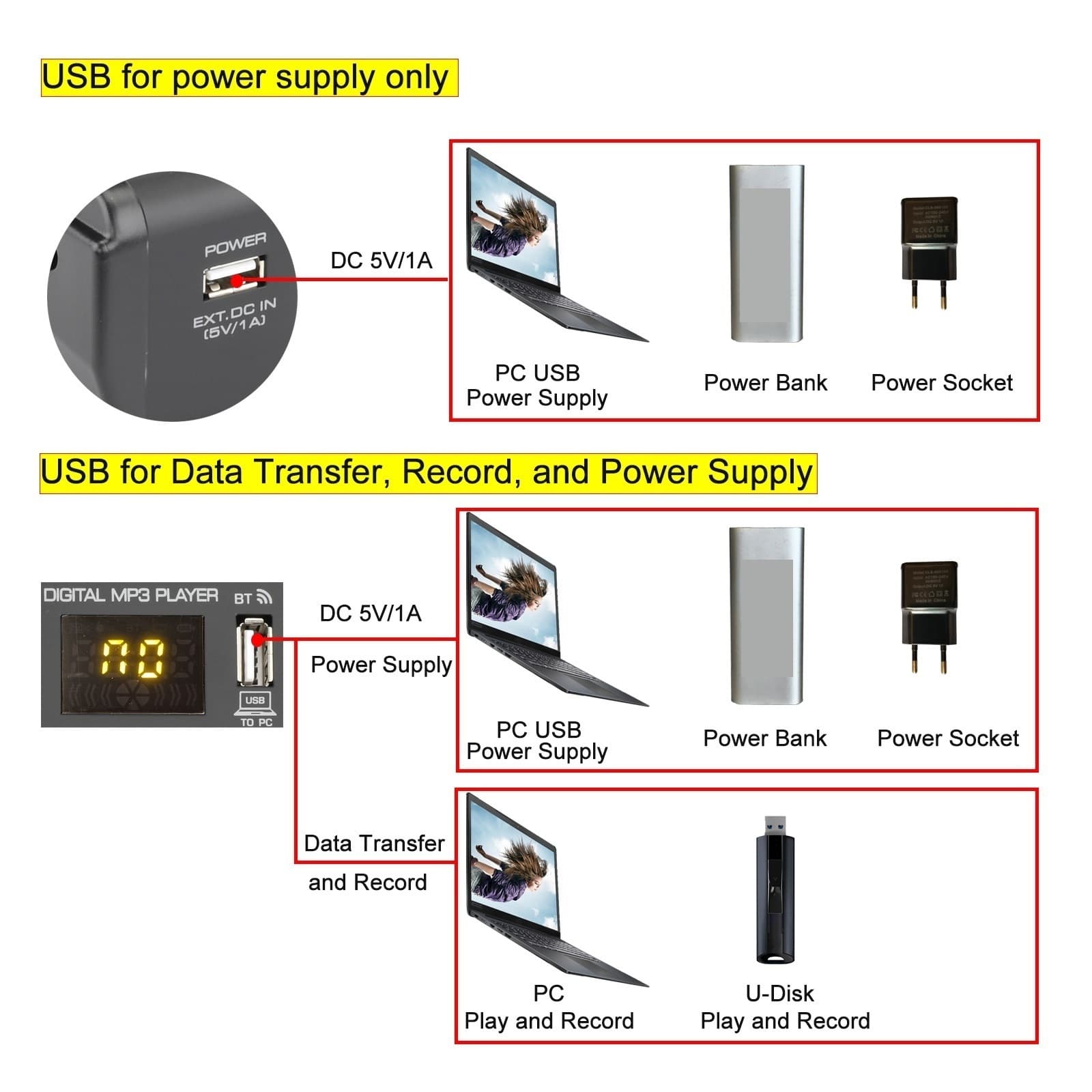
Sound Card Mixing Console 48V 16 digital USB Record Function DJ Mixer 6-channels Features 1. 6 input channels mixer. 2. +48V phantom power. 3. 16 DSP Digital Effect. 4. USB MP3 Play with built-in EQ, USB stick record. 5. Function. 6. Sound card function n mixer. 1) mixer signal to Computer for play and Record. 2) pc signal to mixer 7. USB Power Supply. General Specification +48V Phantom Power For this model, there is only 1 +48V phanotm power switch. Please note: A) +48V Phantom Power is only for XLR ,not for 6.3 . B) When you use Dynamic Microphone, please do not turn on the +48V Phantom, otherwise the dynamic microphone maybe burnt. C) Once you turn on the +48V Phantom Power, all XLR input sockets will provide +48V phantom power. USB Function 1. Button Function: a) "REC" Button----Press first time to pause the playing song. Press again to continue playing. b) "-" Button-------- Short press to play the previous song.Long press to reduce the input volume. c) "+" Button--------Short press to play the next song. Long press to increase the input volume. d) "MODE" Button---- Press to switch the functional model. Select USB, BT, REC in order. 2. USB Play a. Insert USB Stick b. Press the button to choose USB Mode c. Adjust channel level to adjust the channeloutput volume d. Adjust Main Fader to adjust the main outputvolume e. Adjust Channel EQ 3. EQ control key There are 6 kinds of sound effects. (Normal/Rock/Pop/Classic/Jazz/Country) 4. USB Recording operation a) Press the "MODE" button to select the REC status. b) Press "REC" button to start recording, the LED screen shows the recording time. c) Press "REC" button again to pause the recording. d) Press the "MODE" button back out the recording. Function a) Press the "MODE" button in order to select the mode. After the success of the selection, the icon on display is flashing and display BT. b) Open the for pairing. After the success of the pairing, there will be a sound prompt. Sound Card Function 1. USB record, date transfer and power supply 2. PC Record When connect the computer data cable, it will enter the PC playing states automatically . The computer will install the driver automatically at the first connection, need to wait until the installation finish, to play or record USB Power Supply Connected withPC USB port,Power bank, Power Adapterto supply power to mixer. It must meet the following requirements:Output voltage: 4.8V to 5.2V Details For AG-06M 6 channels Mixer 1. Power Supply Connected with PC USB port, Power bank,Power Adapter to supply power to mixer. It must meet the following requirements: Output voltage: 4.8V to 5.2V 2.[MIC/LINE] Mono input. Connect themicrophone, musical instrument or device (CD player and so on) to the device.The sockets are supporting both XLR andUNBAL ANCED 1/4". 3. [+48V PHANTOM POWER] when thebutton is urned on, provide DC+48V phantompower to XLR on MIC mono input. Pleaseturn on this button when using the condensermicrophone which is powered by a phantompower. 4. [+48V PHANTOM LED] when thebutton is turned on, the LED light is on. 5. [POWER] Button Power on/off the mixer. 6. [CH/USB CONVERT SWITCH] Converting switchfor "channel" and "USB signal" 7. [MAIN OUT] Output. Connect the active speaker oramplifier. 8.[GAIN] Controller Determines the basicvolume of each channel, adjust them for themaximum volume performance, when thevolume gets too loud, the [P EAK] LEDindicator light will keep flashing. 9.[HIGH] Treble tone controller Adjust thecontroller to enhance or attenuate for 15dB at12KHz. 10.[LOW] Bass tone controller Adjust thecontroller to enhance orattenuate for 15dB at 80Hz 11. [FX] Controller 1) Adjust the signal level fromthe channel to the reverberation line. 2) Pleasenote, the signal level will vary with thedifferent setting of the channel attenuator. 3) Ifusing the stereo channel, will mix the signalsfrom L and R channels, then, send it toreverberation line. 12. [LEVEL] Controller Adjust to balance thevolume of each channels. 13. [PEAK] LED indicator light 1) when the volume of input signal or volume after adjustingequalizer is too high, the LED indicator lightwill keep flashing, 2) please rotate the [GAIN]ONTROLLER counterclockwise to turn downthe volume. 14. [DSP Select] Can choose to make with digitaleffects (Hall, Room, Reverb etc. see the effectlist on mixer surface). Or, only make DELAYwith 16 level adjustment. 15.[PARAMETER CONTROL IF MAKE WITH DIGITALEFFECTS] Used to adjust the depth of the selected effect,speed, etc 16. [FX LEVEL] Effects return to level controller Adjust the volume of effect. 17. [PHONES LEVEL ] Earphone controller Adjustthe volume of earphone. 18. [POWER INDICATOR] The indicators light upwhen the mixer's power is on. 19. [LEVEL INDICATORS] Show the signal levelfrom[MAIN OUT]out. Adjust the [LEVEL]controller to lower the l
Shipping & Returns
Shipping & Returns